The feature should work with most NFC reader-enabled Android phones.
Unfortunately, we cannot confirm whether all Android devices with NFC are compatible with the virtual transit fare purchase feature.
The Charter of the French language and its regulations govern the consultation of English-language content.
New for Android users! The Chrono app now lets you buy your virtual fares and ride without a card—using just your cell phone. Learn how to purchase virtual fares right in the Chrono app and how it can make your trips easier.
Most regular fares will be available as virtual fares, including:

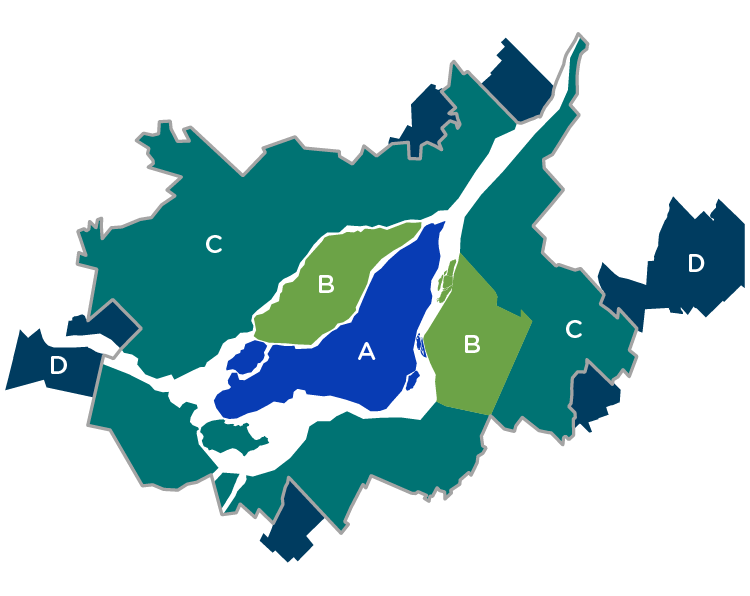
All Modes fares allow you to use the metro, REM, and bus services when purchased in virtual format. All Modes virtual fares also let you use the train when you purchase a monthly or weekly pass. You may choose between All Modes A, AB, ABC and ABCD fares.

Bus fares give you access to bus services only. You may choose between the Bus fare and the Out-of-Territory Bus fare.

The Unlimited Evening and Unlimited Weekend fares allow unlimited travel in zones A, B, C and D, regardless of the public transit mode you choose. The more you use your pass, the more you save!
Some fares, including reduced fares, are not yet available for this feature. For the fares that can’t yet be purchased as virtual fares, users can still get them with the OPUS Reload feature.
The All Modes, Unlimited Evening and Unlimited Weekend transit fares can only be validated on buses, the metro and the REM. Bus and Out-of-Territory Bus fares can only be validated on buses.
Are you travelling by train?
At this time, a virtual fare cannot be validated before boarding the commuter rail system; therefore, only weekly and monthly fares are accepted.
Chrono is the official public transportation app for the Greater Montréal area.
It gives you access to the most comprehensive information about the entire metro, REM, train and bus network. You can also plan and manage your trips, and purchase your transit fares—all in one place.
How to buy fares in the app You have two options:
Only regular fares are available as virtual fares through the Chrono app. If you want to avoid lines and buy your transit fare without leaving home, there’s a digital solution for you, too.
Students and people age 65 and older can reload their OPUS cards directly in the Chrono app without having to go anywhere.
The feature should work with most NFC reader-enabled Android phones.
Unfortunately, we cannot confirm whether all Android devices with NFC are compatible with the virtual transit fare purchase feature.
No. All virtual cards in your wallet are created without any additional fees. You only pay for the transit fares you buy.
Transit fares and cards purchased through the Chrono app are stored on your mobile device. Under these circumstances, they cannot be added to your digital wallet (e.g., Google Wallet or any other similar app).
No, your cards aren’t synced, as they are two different kinds of fare media. Their fare content is mutually exclusive and non-transferable.
Due to technological limitations of the OPUS ticketing system and the current operation of the transit fare validation system across the entire network, it is unfortunately not possible to put all your transit fares on a single card.
For now, each virtual card is linked to one or more specific travel zones, and you can only purchase your virtual transit fare if you have the appropriate card.
Yes. To use the feature for purchasing and validating virtual transit fares, you must first create a Chrono account and log in.
The virtual transit fares you purchase will be stored directly on your mobile device.
You can link your account to several different mobile devices. However, a single user’s (a single account’s) virtual fares can only be present on one device at a time.
The following regular transit fares can be purchased and validated using your phone:
If you need to purchase another one of these transit fares to get around, you can buy it using the “OPUS Reload” feature in the Chrono app (a physical OPUS card is required) or at one of the many retail locations throughout the Greater Montréal area.
Your virtual card can hold up to four different transit fares. Using some of your transit fares will allow you to buy new ones.
Yes. An Internet connection (Wi-Fi or cellular data plan) is required to pay for your transit fare.
No, you do not need to be connected to the Internet (Wi-Fi or mobile data plan) to validate your transit fare. Simply tap your mobile device on the fare reader.
No. Validating virtual transit fares on Android relies on HCE (Host Card Emulation) technology, which allows your phone to simulate a transit card to validate your pass.
Unlike physical cards, this technology requires your device to be turned on and have a minimum battery charge (at least 5%) to function properly.
Below this threshold, validation may fail. To avoid any inconvenience, we recommend that you ensure your phone is sufficiently charged for the duration of your trip
No. You don’t have to launch the Chrono app to validate your transit fare. Just unlock your mobile device, and tap it on the fare reader.
Virtual Bus and Out-of-Territory Bus transit fares can be validated on buses.
The All Modes, Unlimited Evening and Unlimited Weekend transit fares can be validated on buses, the metro and the REM. However, they cannot be validated in the commuter train network.
Unfortunately, the fare readers currently installed in train stations do not yet support the validation of virtual fares in accordance with the required operational standards. This equipment will need to be upgraded to enable the validation of virtual fares on this network.
Until then, monthly and weekly All Modes virtual fares are nevertheless accepted on board commuter trains on the honour system.
As is the case for physical OPUS cards, transit fares loaded onto a single virtual card follow priority. The transit fare on your virtual card that is the most cost-effective for you will be used first, in this order:
Please refer to the instructions on the visual of your cards. You will see the message “Active card” at the bottom left of the card that is ready to be used at a fare reader.
To activate another card, click the “Activate this card” button that appears at the bottom of the card you want to activate. You can also do this by clicking the three small vertical dots that appear at the top right of the card, and then clicking “Activate the card for my trip.”